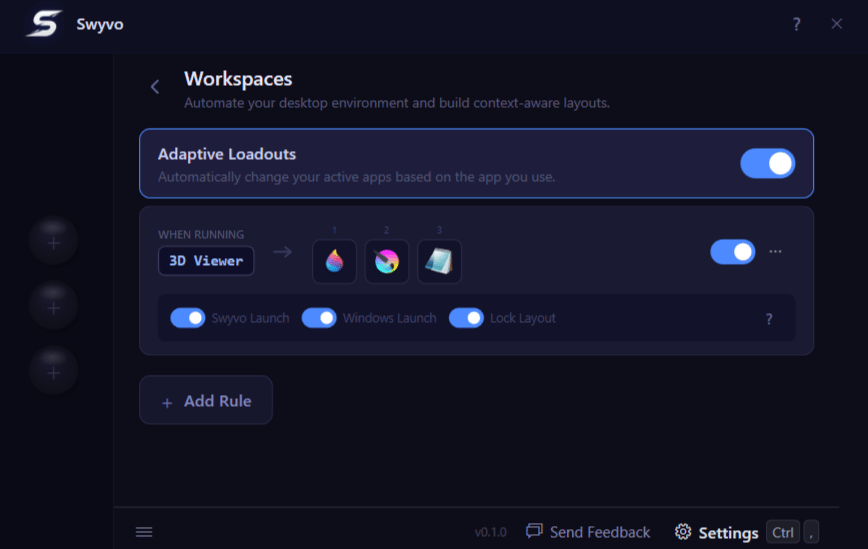
Adaptive Loadouts
When you are deep in a project, you probably only need a specific set of tools. Adaptive Loadouts let you define which apps appear in your slots for each context — and Swyvo swaps them in automatically the moment that app starts running, then reverts back to your default slots when it stops. For example: when you open your code editor, your slots could automatically switch to your terminal, documentation, and design tool — then go back to normal when you close it. You can enable or disable all rules at once with the toggle at the top.Rules
Each app can have one rule that decides which apps fill your slots when it is running.- Swyvo Launch: The rule activates when you launch this app from within Swyvo.
- OS Launch: The rule activates when you launch this app normally (outside of Swyvo), for example from the taskbar or desktop.
- Lock Layout: When enabled, your slot layout stays fixed while you switch between the main app and the apps in the loadout — so Swyvo does not revert to your default slots mid-session.
Deleting a saved website
If you delete a saved website that a rule is watching, Swyvo asks you what to do first.- Delete Website Only: The website leaves My Apps, but the rule stays. Your slots still switch when you open that site. The rule shows Unsaved until you add the same website again.
- Delete Website & Associated Rules: The website and those rules are both removed.
- Cancel: Nothing is deleted.
Keyboard Navigation
Pro-tip: Click the ? button or pressCtrl + F1 to quickly see how to navigate the page.
By pressing Tab you can move between the Adaptive Loadouts toggle button, the rules list and the + Add Rule button.When the focus is on the rules list, using the Up/Down arrows you can select the rule you want and with the Left/Right arrows you can cycle focus between the buttons inside that rule.
Pressing the
Spacebar or Entertoggles any focused toggle buttons and pressing Enter clicks any focused button.You can edit a rule by pressing
Alt + Enter when focused and also press Ctrl + N to Add Rule.