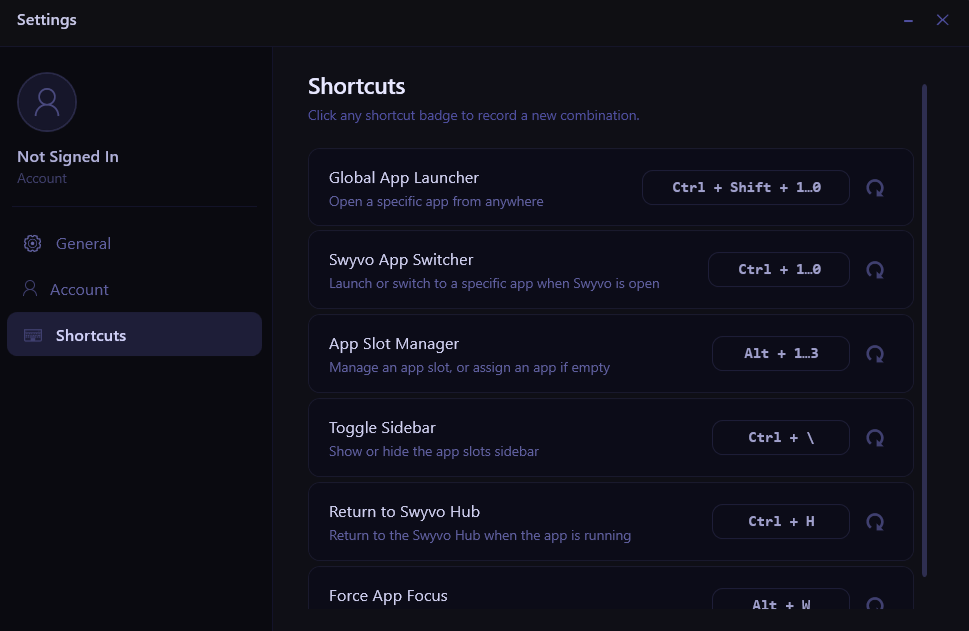
Some shortcuts work from anywhere on your PC. Others only work when Swyvo is open or when you are inside a Swyvo App — an app running inside Swyvo’s window.
Shortcuts
- Global App Launcher — Press
Ctrl + Shift + 1–9, 0to launch a specific slot app from anywhere on your PC, even when Swyvo is not open. Slot 1 is the top slot, slot 10 (Ctrl + Shift + 0) is the bottom. Requires Swyvo to be running in the background. - Swyvo App Switcher — Press
Ctrl + 1–9, 0to launch a slot app when the Swyvo Hub is open, or switch to a slot app when you are already inside a Swyvo App. - App Slot Manager — Press
Alt + 1–9, 0to manage a specific slot or assign an app to an empty one. Only works when the Swyvo Hub is open. - Toggle Sidebar — Press
Ctrl + \to show or hide the app slots sidebar while inside a Swyvo App. Hiding it gives you more screen space. - Return to Swyvo Hub — Press
Ctrl + Hto go back to the hub from any Swyvo App. - Force App Focus — Press
Alt + Wto toggle focus between your current Swyvo App and the last OS window you were using. Lets you quickly ping-pong between two windows without clicking. - Open Main App — Press `Ctrl + “ to open the main app of the current Adaptive Loadout. Only works when Lock Layout is on.
- Maximize/Restore Web App — Press
Ctrl + F11to maximize or restore the window size of a web app.