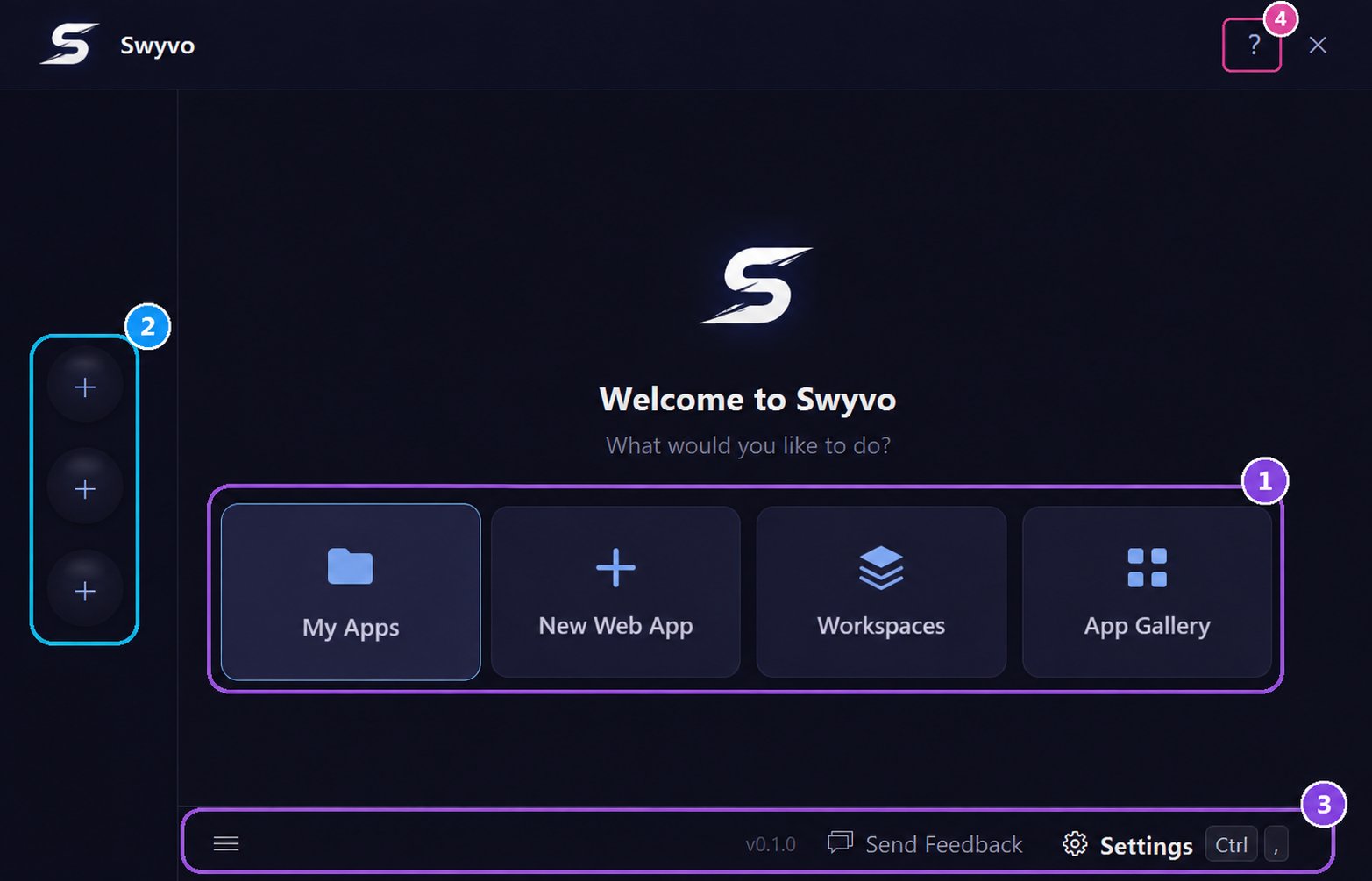
1. Main Navigation
- My Apps: View, filter, and manage all your installed and web apps.
- New Web App: Instantly add a new website to your Swyvo environment.
- Workspaces: Create rules to automatically change the available apps based on the app running.
- App Gallery: Discover and add pre-configured web apps to your library.
2. App Slots
The app slots are the quick-access buttons on the left side of the hub. Pin your most-used apps here so you can launch or switch to them instantly with a single click or a keyboard shortcut — without opening My Apps every time.- Free plan: 3 slots. Pro plan: 10 slots.
- Add an app to a slot: Click an empty slot, or right-click any app in My Apps and choose Add to Slot.
- Remove or replace a slot: Right-click a filled slot to remove the app, swap it for another, or manage it.
- Once an app is in a slot, it opens inside Swyvo’s window. Press
Ctrl + 1–9, 0to switch between them by keyboard (see Shortcuts).
3. Settings
- System Menu: Access the bottom-left hamburger menu to quit the app or open settings.
- Quick Settings: Press
Ctrl + ,at any time on the Home Screen to instantly jump into your Settings menu. - Send Feedback: Have a question/suggestion, want to report a bug or have a problem click this and our contact form will open to get in touch with the team.
4. Quick Help
Click the ? button or pressCtrl + F1 to instantly open the relevant manual page for the screen you are currently viewing. Opening it on the main menu you will see all the Shortcuts and the Keyboard Navigation for this page
Keyboard Navigation
You can navigate the central buttons with Left/Right arrows. PressingTab and Shift + Tab changes focus between the Main Navigation, the App Slots and the Settings menus.When focus is on the app slots you can navigate them with Up/Down arrows and change their position with
Shift + Up/Down.You can manage the app slots with
Alt + 1-9, 0 (check Shortcuts for more details).You can quit Swyvo with
Ctrl + Q and then Enter.