> ## Documentation Index
> Fetch the complete documentation index at: https://manual.swyvo.app/llms.txt
> Use this file to discover all available pages before exploring further.
# Shortcuts
Contains all shortcuts you can use to help you never leave your keyboard, make you faster and improve the overall experience.
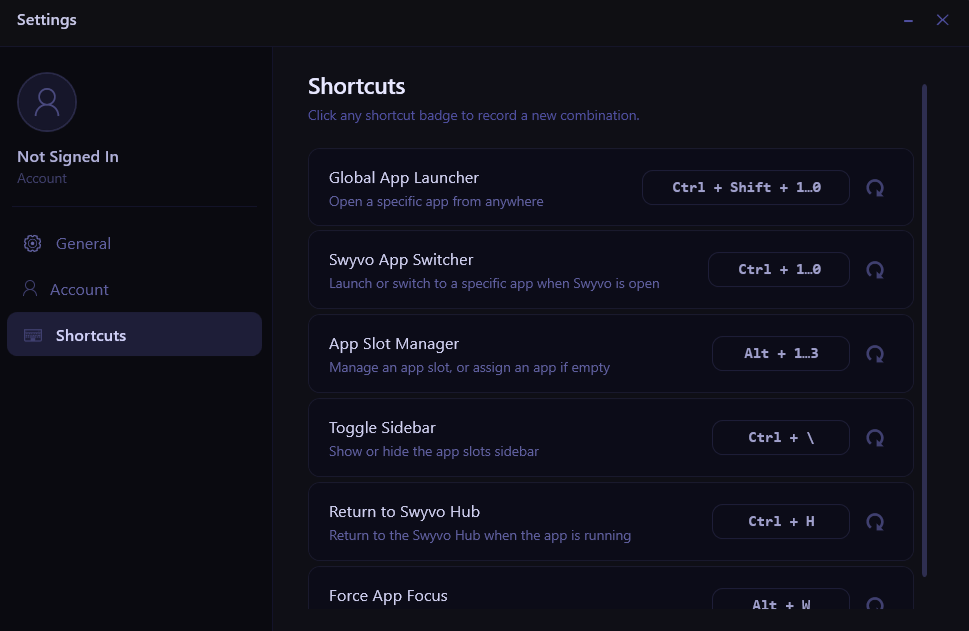 ### Shortcuts
* **Global App Launcher**: Use `Ctrl + Shift + 1,2,3 ` to launch a specific app (where the app that occupies the higher app slot is at slot number 1 and the app that occupies the lower slot is at slot number 3) even when Swyvo Hub or Swyvo App (an app running through Swyvo) isn't currently open (requirement: Swyvo **must** run in the background)**.**
* **Swyvo App Switcher**: Use `Ctrl + 1,2,3 ` to launch a specific app when Swyvo Hub is open or switch to a specific app when a Swyvo App is open.
* **App Slot Manager**: Use `Alt + 1,2,3 ` to manage a specific app or assign an app if the app slot is empty (only works when Swyvo Hub is open - not working when a Swyvo App is open).
* **Toggle Sidebar**: Use `Ctrl + \ ` to show/hide the app slots sidebar when a Swyvo App is open. Hiding the sidebar reduces the screen size taken by the app giving you more room to work.
* **Return to Swyvo Hub**: Use `Ctrl + H ` to return to Swyvo Hub when you're using a Swyvo App.
* **Force App Focus**: Use `Alt + W ` to change focus between Swyvo Hub or a Swyvo App and the last OS window you were working on. Using this shortcut enables you to easily ping-pong between the two windows you're working on without needing to click on a window to change focus or double `Alt + Q` to hide and then show again the Swyvo App.
#### Manage Shortcuts
You can edit all shortcuts to fit your preferences by clicking on the shortcut buttons and then pressing the shortcut you want. You can quickly go back to the default shortcut by clicking the circled arrow button next to the shortcut button.
### Shortcuts
* **Global App Launcher**: Use `Ctrl + Shift + 1,2,3 ` to launch a specific app (where the app that occupies the higher app slot is at slot number 1 and the app that occupies the lower slot is at slot number 3) even when Swyvo Hub or Swyvo App (an app running through Swyvo) isn't currently open (requirement: Swyvo **must** run in the background)**.**
* **Swyvo App Switcher**: Use `Ctrl + 1,2,3 ` to launch a specific app when Swyvo Hub is open or switch to a specific app when a Swyvo App is open.
* **App Slot Manager**: Use `Alt + 1,2,3 ` to manage a specific app or assign an app if the app slot is empty (only works when Swyvo Hub is open - not working when a Swyvo App is open).
* **Toggle Sidebar**: Use `Ctrl + \ ` to show/hide the app slots sidebar when a Swyvo App is open. Hiding the sidebar reduces the screen size taken by the app giving you more room to work.
* **Return to Swyvo Hub**: Use `Ctrl + H ` to return to Swyvo Hub when you're using a Swyvo App.
* **Force App Focus**: Use `Alt + W ` to change focus between Swyvo Hub or a Swyvo App and the last OS window you were working on. Using this shortcut enables you to easily ping-pong between the two windows you're working on without needing to click on a window to change focus or double `Alt + Q` to hide and then show again the Swyvo App.
#### Manage Shortcuts
You can edit all shortcuts to fit your preferences by clicking on the shortcut buttons and then pressing the shortcut you want. You can quickly go back to the default shortcut by clicking the circled arrow button next to the shortcut button.