> ## Documentation Index
> Fetch the complete documentation index at: https://manual.swyvo.app/llms.txt
> Use this file to discover all available pages before exploring further.
# New Web App
Turn any website into a dedicated, switchable application within your Swyvo workspace. Instead of losing tabs in your browser, bring your web tools directly into your deep-focus environment.
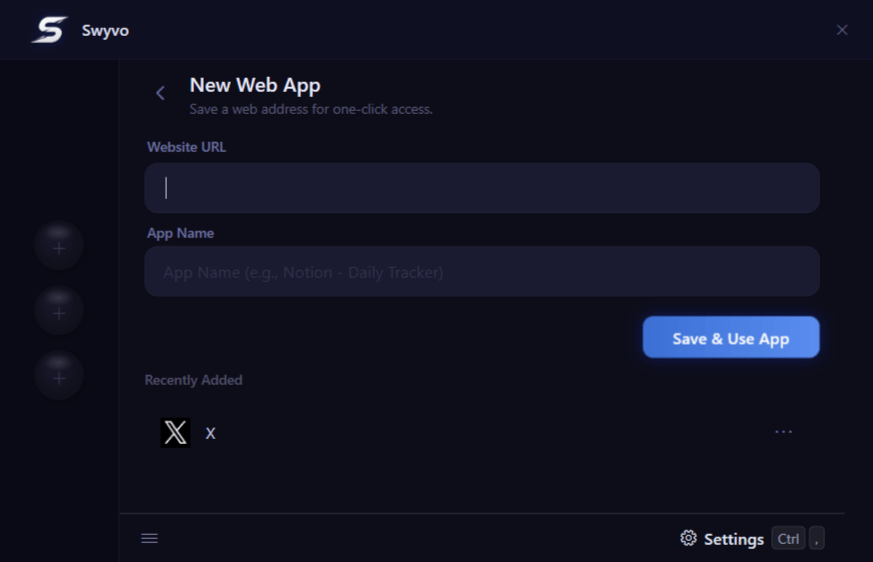 * **Website URL:** Simply paste the URL of any website.
* **App Name:** The app name gets auto-filled but you can edit it too.
* **Recently Added:** Instantly view your most recently configured websites at a glance, making it easy to quickly review and use them.
* **Website URL:** Simply paste the URL of any website.
* **App Name:** The app name gets auto-filled but you can edit it too.
* **Recently Added:** Instantly view your most recently configured websites at a glance, making it easy to quickly review and use them.
*Pro-tip:* Right-click or use the three-dot menu on a web app to edit or delete it completely.
* **Seamless Integration:** Once saved, your custom web app behaves exactly like a native local application. It instantly appears in your [**My Apps**](/my-apps) list, ready for use.