> ## Documentation Index
> Fetch the complete documentation index at: https://manual.swyvo.app/llms.txt
> Use this file to discover all available pages before exploring further.
# General
Contains settings that control your everyday Swyvo experience
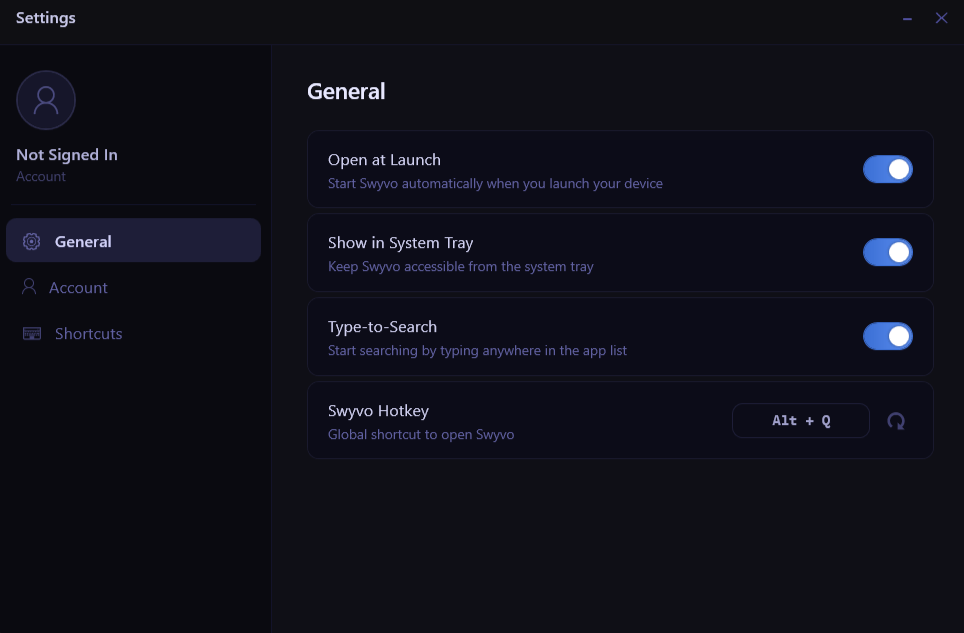 * **Open at Launch**: When enabled Swyvo will run in the background from the moment you launch your device ready for you to open using the Swyvo Hotkey `Alt + Q `
* **Show in System Tray**: When enabled Swyvo button will appear on the System Tray from where you can open or quit Swyvo.
* **Type-to-Search**: When enabled you can start typing to start searching the app you want without needing to click on the searchbar.
* **Swyvo Hotkey**: Use `Alt + Q ` to show/hide Swyvo or any app running through Swyvo at any time.
* **Open at Launch**: When enabled Swyvo will run in the background from the moment you launch your device ready for you to open using the Swyvo Hotkey `Alt + Q `
* **Show in System Tray**: When enabled Swyvo button will appear on the System Tray from where you can open or quit Swyvo.
* **Type-to-Search**: When enabled you can start typing to start searching the app you want without needing to click on the searchbar.
* **Swyvo Hotkey**: Use `Alt + Q ` to show/hide Swyvo or any app running through Swyvo at any time.